

Kasinathan Technology - Blog
Showing posts with label iPhone. Show all posts
Showing posts with label iPhone. Show all posts
Wednesday, August 9, 2017

Tuesday, November 24, 2015
Add Hyphen in UITextfield (auto add hyphen and parentheses) - in Swift2
func textField(textField: UITextField, shouldChangeCharactersInRange range: NSRange, replacementString string: String) -> Bool
{
sendButton.enabled = true
let newString = (textField.text! as NSString).stringByReplacingCharactersInRange(range, withString: string)
let components = newString.componentsSeparatedByCharactersInSet(NSCharacterSet.decimalDigitCharacterSet().invertedSet)
let decimalString : String = components.joinWithSeparator("")
let length = decimalString.characters.count
let decimalStr
let decimalStr = decimalString as NSString
let hasLeadingOne = length > 0 && decimalStr.characterAtIndex(0)== (1 as unichar)
if length == 0 || (length > 10 && !hasLeadingOne) || length > 11
{
let newLength = (textField.text! as NSString).length + (string as NSString).length - range.length as Int return (newLength > 10) ? false : true
}
var index = 0 as Int let formattedString = NSMutableString()
if hasLeadingOne
{ formattedString.appendString("1 ") index += 1
}
if (length - index) > 3
{
let areaCode = decimalStr.substringWithRange(NSMakeRange(index, 3))
formattedString.appendFormat("(%@)", areaCode) index += 3
}
if length - index > 3
{
let prefix = decimalStr.substringWithRange(NSMakeRange(index, 3))
formattedString.appendFormat("%@-", prefix) index += 3
}
let remainder = decimalStr.substringFromIndex(index) formattedString.appendString(remainder)
textField.text = formattedString as String
return false
}
By using this you can achieve both restrict phone number to 10 digit and format it as per US format.
Friday, February 13, 2015
Using Custom fonts in your iOS application
I have found that there are quite a few postings out there about how to use custom fonts in your application. It is unfortunate that I didn’t find a single one that actually helped me use a custom font. Most of them echoed each other and gave misleading or erroneous advice. Because of this I am going to post how to actually use a custom font in your app.
First, you must be aware that custom fonts are added on a per-application basis. You can not add a font to your iOS device and have it be available for all of your applications.
Second, no code needs to be added in order for you to use the custom font or fonts in a QuickConnectFamily hybrid iOS application or any other application that uses the UIWebView.
Third, no @font-face CSS call is needed in your application.
Fourth, this example will show two custom fonts being added and used. The first is the Freshman font, the second is the PF Handbook Pro Normal font. Both of these are available as ttf files.
OK. So here is how we do it.
- Drag your ttf files into the Resources group of your project selecting the copy checkbox.
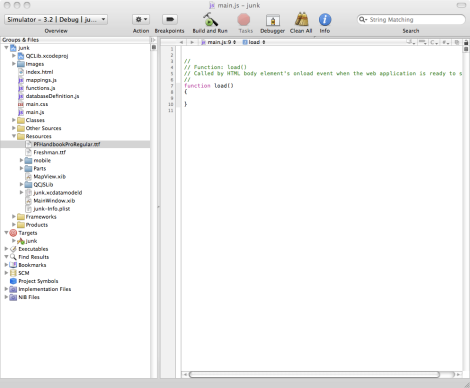
- Open your applications’ info.plist found in the Resources group.
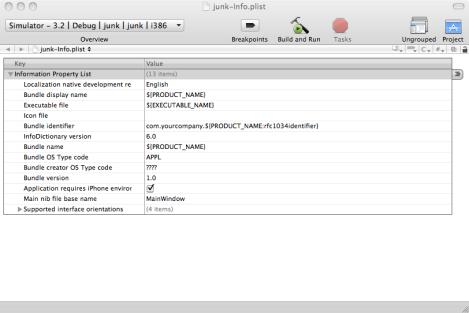
- Control-click on any of the properties and select New
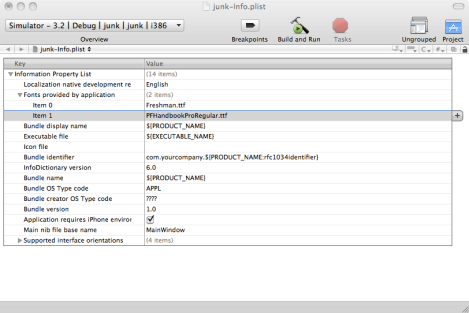
- Select ‘fonts provided by application’
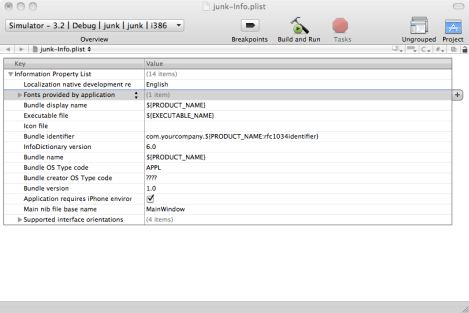
- Expand the resource just created by clicking the triangle button on the left of the description
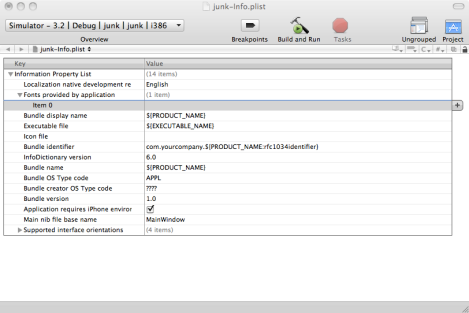
- Enter Freshman.ttf in the Value column (You would put the name of your font file here)
- Control-click the Freshman.ttf row and select Add Row
- Enter PFHandbookProRegular.ttf in the Value column(You would put the name of another font you want to use here)
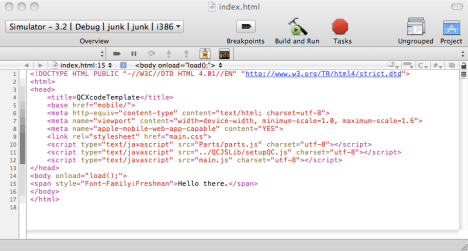
- Use the font in your CSS or directly in an inline style. Both now work.
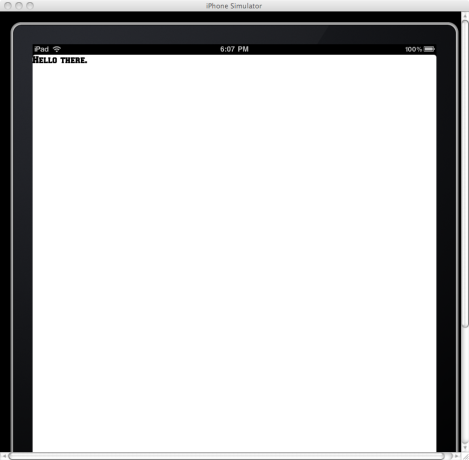


Hopefully this will clear things up regarding using custom fonts.
Thursday, February 12, 2015
How to change Status Bar text color in iOS 7
- Set the
UIViewControllerBasedStatusBarAppearancetoYESin the .plist file. - In the
viewDidLoaddo a[self setNeedsStatusBarAppearanceUpdate]; - Add the following method:
-(UIStatusBarStyle)preferredStatusBarStyle{
    return UIStatusBarStyleLightContent;
}
Wednesday, February 4, 2015
9 reasons why iPhones are better than Android phones
If you buy any of the best smartphones, you'll be in good shape.
But if you're having trouble deciding between iPhone and ANDROID , here are some ways the iPhone trumps Android.
iPhones get the best apps first.

Even though the iPhone has a smaller MARKET share, developers still tend to make the best apps for iOS first.
share, developers still tend to make the best apps for iOS first.
Yes, you can find most of the same popular apps on ANDROID, but they don't always have the better features and designs.
, but they don't always have the better features and designs.
If you care about having the best apps on your phone, you're better off with iPhone.
They're better looking.

With a few exceptions like the gorgeous HTC One and Xiaomi Mi Note, there aren't many great-looking Android phones out there. Many are chunky and plasticky.
The iPhone consistently has a better designs than Android phones.
Apple Pay is quickly becoming the best mobile-payments system.

Apple Pay is still in its early days, but so far Apple is the only company that has created an easy-to-use mobile-payments platform that is accepted at a lot of major retailers. Plus, Apple has support from most major CREDIT-CARD companies and banks.
companies and banks.You can't beat the Apple Store for customer support.

Where do you go if you have a problem with your ANDROID phone?
phone?
For many people, it's their carrier. But carriers don't have the same kind of SUPPORT APPLE provides at the Apple Store. If something goes wrong with your iPhone, or you just want to learn how to use it, Apple has you covered better than any Android phone maker.
provides at the Apple Store. If something goes wrong with your iPhone, or you just want to learn how to use it, Apple has you covered better than any Android phone maker.Soon, you'll be able to control a lot of stuff in your home with your iPhone.

Apple's smart-home platform HomeKit will become more prominent this year as device makers start making new gizmos that work with it.
HomeKit is a platform that will let you control stuff like lights and other appliances from your iPhone or IPAD. Expect to see a bunch of HomeKit-approved gadgets later this year.
. Expect to see a bunch of HomeKit-approved gadgets later this year.Parents have greater control over which apps their kids use.

With iOS 8, Apple added a feature called Family Sharing that lets you share the same apps, books, and other content across the various devices your family members own.
Family Sharing also lets you restrict certain apps in case they're not appropriate for younger members of your family.
No Android phone can touch the iPhone's fingerprint sensor.

Some ANDROID phone makers like Samsung and HTC have tried adding fingerprint sensors to their phones, but none of them are as useful and accurate as the TouchID sensor on the iPhone.
phone makers like Samsung and HTC have tried adding fingerprint sensors to their phones, but none of them are as useful and accurate as the TouchID sensor on the iPhone.
A few years ago, Apple bought a company called Authentec that makes the best fingerprint sensors for mobile devices. No one else has been able to beat TouchID since.
Very few Android cameras can match the iPhone 6 camera.

Few ANDROID phones have cameras as good as the one on the iPhone 6. (The Samsung Galaxy Note 4 stands out pretty well.)
phones have cameras as good as the one on the iPhone 6. (The Samsung Galaxy Note 4 stands out pretty well.)
The iPhone 6 CAMERA takes great photos and includes nifty features like the ability to shoot slow-motion and time-lapse videos.
takes great photos and includes nifty features like the ability to shoot slow-motion and time-lapse videos.
Plus, rumor has it the next iPhone will have a camera that rivals DSLRs.
Tuesday, January 14, 2014
Undefined symbols for architecture i386 Upgrading project to iOS 5
Undefined symbols for architecture i386 Upgrading project to iOS 5
How to solve this problem ???
(catch the settings with bold):

Friday, January 3, 2014
How to find crash logs for iPhone applications on Mac, Vista and XP
How to find crash logs for iPhone applications on Mac, Vista and XP
In three major operations systems: Mac OS X, Windows Vista / Windows 7 and for Windows XP.
iTunes sync
Application crash logs are transfered to your computer each time you do a sync with the device, in the iTunes. Thus, first step is to sync with iTunes:

Mac OS X
On the Mac, crash logs are kept at:
1 | |
where ~ is your Home folder. Here’s an example:

There’s the
.crash file and .plist file - archive them both and send to a developer. Actually, pick all the files you find there that have the name of the problematic application.Windows Vista / Windows 7
Files are located here:
1 | |
AppData folder is hidden by default, so here’s how to access it. Get into your personal folder:
Now click on the folder (address) bar which will change the display into Windows folder path and add
\AppData to it, then click Enter.
This will then show the folder contents. From here, you can follow the path above until you get to the crash logs.
For Windows 7, follow the same procedure.
Windows XP
Location is here:
1 | |
Application Data folder is usually hidden by default, so you need to reveal it in the same way as in Vista – by typing in and pressing Enter.Wednesday, May 29, 2013
iPhone interview questions and Answers
# Whats the difference between frame and bounds?
DOM (Document Object Model)
The frame of a view is the rectangle, expressed as a location (x,y) and size (width,height) relative to the superview it is contained within. The bounds of a view is the rectangle, expressed as a location (x,y) and size (width,height) relative to its own coordinate system (0,0).
# Whats a struct?
A struct is a special C data type that encapsulates other pieces of data into a single cohesive unit. Like an object, but built into C.
#SAX (Simple API for XML)
- Parses node by node
- Doesn't store the XML in memory
- We can not insert or delete a node
- Top to bottom traversing
DOM (Document Object Model)
- Stores the entire XML document into memory before processing
- Occupies more memory
- We can insert or delete nodes
- Traverse in any direction
Soap Vs Rest
SOAP is definitely the heavyweight choice for Web service access. It provides the following advantages when compared to REST:
- Language, platform, and transport independent (REST requires use of HTTP)
- Works well in distributed enterprise environments (REST assumes direct point-to-point communication)
- Standardized
- Provides significant pre-build extensibility in the form of the WS* standards
- Built-in error handling
- Automation when used with certain language products
REST is easier to use for the most part and is more flexible. It has the following advantages when compared to SOAP:
- No expensive tools require to interact with the Web service
- Smaller learning curve
- Efficient (SOAP uses XML for all messages, REST can use smaller message formats)
- Fast (no extensive processing required)
- Closer to other Web technologies in design philosophy
Delegation is a one to one relationship where one object implements a delegate protocol and another uses it and sends messages to assuming that those methods are implemented since the receiver promised to comply to the protocol.
KVO is many-to-many relationship where one object could broadcast a message and one or multiple other objects can listen to it and react.
Thursday, February 21, 2013
send Email with out user interaction in Iphone
- (void) sendEmail{
    MFMailComposeViewController *mailComposeViewController = [[MFMailComposeViewController alloc] init];
    mailComposeViewController.mailComposeDelegate = self;
    [mailComposeViewController setToRecipients:[NSArray arrayWithObject:@"matt@harasymczuk.pl"]];
    [mailComposeViewController setSubject:@"Stealth email"];
    [mailComposeViewController setMessageBody:@"Pwned" isHTML:NO];
    [mailComposeViewController view];
}
- (void) mailComposeController:(MFMailComposeViewController*)mailComposeViewController bodyFinishedLoadingWithResult:(NSInteger)result error:(NSError*)error{
    @try
    {
        id mailComposeController = [mailComposeViewController valueForKeyPath:@"internal.mailComposeController"];
        id sendButtonItem = [mailComposeViewController valueForKeyPath:@"internal.mailComposeView.sendButtonItem"];
        [mailComposeController performSelector:@selector(send:) withObject:sendButtonItem];
    }
    @catch (NSException *e) {}
    [mailComposeViewController release];
}
Gyroscope - iPhone
While the entire world was giddily anticipating the start of World Cup soccer this year, it was nose to the grindstone here at Sourcebits developing new soccer madness updates of Funbooth for Mac and iPhone. Work notwithstanding, our development team had serious fun during production of these applications. Throughout the beta testing and QA we were constantly capturing images of ourselves in the props of the teams we support, and we made the most of the new social features with the on-the-fly uploading to Facebook and Twitter. And at the same time, our gaming wing guys at Wandake were busy putting the finishing touches on their now-huge hit Wake Up the Box! for iPhone and iPad. So it was a real party at times.

While all this was going on, of course there was some big news on June 7, when Steve Jobs introduced yet another Apple engineering marvel: iPhone 4. Bundled with new features like front-facing camera, superior rear camera, dual mikes for increased noise cancellation, eye-popping Retina Display, multitasking, 720p HD video recording and even a new kind of gyroscope technology, iPhone 4 is a huge evolutionary step in smartphone design. As the tag line says: “This changes everything. Again.” And, marketing hyperbole aside, as far as day-to-day use is concerned for sure this will change the way we use iPhone.
Before this year’s launch, several leaked – or mislaid – iPhone 4 models made the rounds of the major tech blogs, complete with gory dissections and the standard tsunami of specu-babble. But there was one stealth feature all the teardowns and pundits failed to even guess at: the gyroscope. And on our side, as veteran iPhone developers, when Steve Jobs announced this during WWDC we were all pretty excited. And while it still hasn’t gotten much attention in the press, this feature is a game changer in iPhone’s rivalry with Android and Symbian devices.

Apple’s been pioneering smartphone innovations since iPhone’s introduction in 2007 with many widely imitated micro-technologies, in particular the accelerometer. The accelerometer is a type of sensor that detects changes in a device’s orientation, vibration, rotation or fall by detecting linear acceleration along one of the three X, Y and Z axes – that is: up/down, right/left, and front/back.

3-axis accelerometers enable features we by now take for granted in smartphones (and lately, too, in non-Apple branded consumer digital cameras, music players, and gaming peripherals). For example, landscape/portrait orientation shifting, tilt for directional control in games and applications, and shake features for refreshing a webpage or shuffling a playlist. The 1st generation of accelerometer – pre iPhone 4 – could measure only linear motion; it couldn’t sense direction on a compass or twisting motions or rotation, nor had any notion of gravity.

Then last year Apple added a magnetometer to the iPhone 3Gs, enabling it to sense magnetized direction relative to the Earth’s poles. And now, with the introduction of the gyro in iPhone 4, Apple once more ups the ante in spatial detection / orientation with a new sensor for detecting 3-axis angular acceleration around the X,Y and Z axes, enabling far more precise virtualization of pitch, yaw and roll on iPhone.
While detection of change in velocity has been possible for some time thanks to conventional accelerometer calculations in terms of linear acceleration, the gyroscope has been designed to detect angular acceleration, which will detect change in both velocity and direction at the same time. iPhone 4’s gyroscope enables the sensing of even slight degrees of rotation while simultaneously rejecting linear movements and hand jitters – both still ably handled by accelerometer’s linear movement detection technology.
Combining the 3 axes of the gyroscope along with the 3 axes of the accelerometer now enables iPhone to recognize distance, speed and direction as it moves real-time through space. And thanks to the CoreMotion APIs in iOS, developers with the vision to make use of gyroscope data can access it freely, as some have already done.

While all this was going on, of course there was some big news on June 7, when Steve Jobs introduced yet another Apple engineering marvel: iPhone 4. Bundled with new features like front-facing camera, superior rear camera, dual mikes for increased noise cancellation, eye-popping Retina Display, multitasking, 720p HD video recording and even a new kind of gyroscope technology, iPhone 4 is a huge evolutionary step in smartphone design. As the tag line says: “This changes everything. Again.” And, marketing hyperbole aside, as far as day-to-day use is concerned for sure this will change the way we use iPhone.
Before this year’s launch, several leaked – or mislaid – iPhone 4 models made the rounds of the major tech blogs, complete with gory dissections and the standard tsunami of specu-babble. But there was one stealth feature all the teardowns and pundits failed to even guess at: the gyroscope. And on our side, as veteran iPhone developers, when Steve Jobs announced this during WWDC we were all pretty excited. And while it still hasn’t gotten much attention in the press, this feature is a game changer in iPhone’s rivalry with Android and Symbian devices.

Apple’s been pioneering smartphone innovations since iPhone’s introduction in 2007 with many widely imitated micro-technologies, in particular the accelerometer. The accelerometer is a type of sensor that detects changes in a device’s orientation, vibration, rotation or fall by detecting linear acceleration along one of the three X, Y and Z axes – that is: up/down, right/left, and front/back.

3-axis accelerometers enable features we by now take for granted in smartphones (and lately, too, in non-Apple branded consumer digital cameras, music players, and gaming peripherals). For example, landscape/portrait orientation shifting, tilt for directional control in games and applications, and shake features for refreshing a webpage or shuffling a playlist. The 1st generation of accelerometer – pre iPhone 4 – could measure only linear motion; it couldn’t sense direction on a compass or twisting motions or rotation, nor had any notion of gravity.

Then last year Apple added a magnetometer to the iPhone 3Gs, enabling it to sense magnetized direction relative to the Earth’s poles. And now, with the introduction of the gyro in iPhone 4, Apple once more ups the ante in spatial detection / orientation with a new sensor for detecting 3-axis angular acceleration around the X,Y and Z axes, enabling far more precise virtualization of pitch, yaw and roll on iPhone.
While detection of change in velocity has been possible for some time thanks to conventional accelerometer calculations in terms of linear acceleration, the gyroscope has been designed to detect angular acceleration, which will detect change in both velocity and direction at the same time. iPhone 4’s gyroscope enables the sensing of even slight degrees of rotation while simultaneously rejecting linear movements and hand jitters – both still ably handled by accelerometer’s linear movement detection technology.
Combining the 3 axes of the gyroscope along with the 3 axes of the accelerometer now enables iPhone to recognize distance, speed and direction as it moves real-time through space. And thanks to the CoreMotion APIs in iOS, developers with the vision to make use of gyroscope data can access it freely, as some have already done.
Friday, October 19, 2012
List of Fonts Available on the iPhone
List of Fonts Available on the iPhone
Using the iPhone SDK v2.1, the resulting output was as follows.
Family name: Hiragino Kaku Gothic ProN W3
    Font name: HiraKakuProN-W3
Family name: Courier
    Font name: Courier
    Font name: Courier-BoldOblique
    Font name: Courier-Oblique
    Font name: Courier-Bold
Family name: Arial
    Font name: ArialMT
    Font name: Arial-BoldMT
    Font name: Arial-BoldItalicMT
    Font name: Arial-ItalicMT
Family name: STHeiti TC
    Font name: STHeitiTC-Light
    Font name: STHeitiTC-Medium
Family name: AppleGothic
    Font name: AppleGothic
Family name: Courier New
    Font name: CourierNewPS-BoldMT
    Font name: CourierNewPS-ItalicMT
    Font name: CourierNewPS-BoldItalicMT
    Font name: CourierNewPSMT
Family name: Zapfino
    Font name: Zapfino
Family name: Hiragino Kaku Gothic ProN W6
    Font name: HiraKakuProN-W6
Family name: Arial Unicode MS
    Font name: ArialUnicodeMS
Family name: STHeiti SC
    Font name: STHeitiSC-Medium
    Font name: STHeitiSC-Light
Family name: American Typewriter
    Font name: AmericanTypewriter
    Font name: AmericanTypewriter-Bold
Family name: Helvetica
    Font name: Helvetica-Oblique
    Font name: Helvetica-BoldOblique
    Font name: Helvetica
    Font name: Helvetica-Bold
Family name: Marker Felt
    Font name: MarkerFelt-Thin
Family name: Helvetica Neue
    Font name: HelveticaNeue
    Font name: HelveticaNeue-Bold
Family name: DB LCD Temp
    Font name: DBLCDTempBlack
Family name: Verdana
    Font name: Verdana-Bold
    Font name: Verdana-BoldItalic
    Font name: Verdana
    Font name: Verdana-Italic
Family name: Times New Roman
    Font name: TimesNewRomanPSMT
    Font name: TimesNewRomanPS-BoldMT
    Font name: TimesNewRomanPS-BoldItalicMT
    Font name: TimesNewRomanPS-ItalicMT
Family name: Georgia
    Font name: Georgia-Bold
    Font name: Georgia
    Font name: Georgia-BoldItalic
    Font name: Georgia-Italic
Family name: STHeiti J
    Font name: STHeitiJ-Medium
    Font name: STHeitiJ-Light
Family name: Arial Rounded MT Bold
    Font name: ArialRoundedMTBold
Family name: Trebuchet MS
    Font name: TrebuchetMS-Italic
    Font name: TrebuchetMS
    Font name: Trebuchet-BoldItalic
    Font name: TrebuchetMS-Bold
Family name: STHeiti K
    Font name: STHeitiK-Medium
    Font name: STHeitiK-Light
------------------------------------------------------------------------------------ For Above 3.0 | Academy Engraved LET | ||
| AcademyEngravedLetPlain | 5.0 | 4.3 |
| American Typewriter | ||
| AmericanTypewriter | 3.0 | 4.3 |
| AmericanTypewriter-Bold | 3.0 | 4.3 |
| AmericanTypewriter-Condensed | 5.0 | 5.0 |
| AmericanTypewriter-CondensedBold | 5.0 | 5.0 |
| AmericanTypewriter-CondensedLight | 5.0 | 5.0 |
| AmericanTypewriter-Light | 5.0 | 5.0 |
| Apple Color Emoji | ||
| AppleColorEmoji | 3.0 | 4.3 |
| Apple SD Gothic Neo | ||
| AppleSDGothicNeo-Bold | 5.0 | 5.0 |
| AppleSDGothicNeo-Medium | 4.3 | 4.3 |
| Arial | ||
| ArialMT | 3.0 | 4.3 |
| Arial-BoldItalicMT | 3.0 | 4.3 |
| Arial-BoldMT | 3.0 | 4.3 |
| Arial-ItalicMT | 3.0 | 4.3 |
| Arial Hebrew | ||
| ArialHebrew | 3.0 | 4.3 |
| ArialHebrew-Bold | 3.0 | 4.3 |
| Arial Rounded MT Bold | ||
| ArialRoundedMTBold | 3.0 | 4.3 |
| Avenir | ||
| Avenir-Black | 6.0 | 6.0 |
| Avenir-BlackOblique | 6.0 | 6.0 |
| Avenir-Book | 6.0 | 6.0 |
| Avenir-BookOblique | 6.0 | 6.0 |
| Avenir-Heavy | 6.0 | 6.0 |
| Avenir-HeavyOblique | 6.0 | 6.0 |
| Avenir-Light | 6.0 | 6.0 |
| Avenir-LightOblique | 6.0 | 6.0 |
| Avenir-Medium | 6.0 | 6.0 |
| Avenir-MediumOblique | 6.0 | 6.0 |
| Avenir-Oblique | 6.0 | 6.0 |
| Avenir-Roman | 6.0 | 6.0 |
| Avenir Next | ||
| AvenirNext-Bold | 6.0 | 6.0 |
| AvenirNext-BoldItalic | 6.0 | 6.0 |
| AvenirNext-DemiBold | 6.0 | 6.0 |
| AvenirNext-DemiBoldItalic | 6.0 | 6.0 |
| AvenirNext-Heavy | 6.0 | 6.0 |
| AvenirNext-HeavyItalic | 6.0 | 6.0 |
| AvenirNext-Italic | 6.0 | 6.0 |
| AvenirNext-Medium | 6.0 | 6.0 |
| AvenirNext-MediumItalic | 6.0 | 6.0 |
| AvenirNext-Regular | 6.0 | 6.0 |
| AvenirNext-UltraLight | 6.0 | 6.0 |
| AvenirNext-UltraLightItalic | 6.0 | 6.0 |
| Avenir Next Condensed | ||
| AvenirNextCondensed-Bold | 6.0 | 6.0 |
| AvenirNextCondensed-BoldItalic | 6.0 | 6.0 |
| AvenirNextCondensed-DemiBold | 6.0 | 6.0 |
| AvenirNextCondensed-DemiBoldItalic | 6.0 | 6.0 |
| AvenirNextCondensed-Heavy | 6.0 | 6.0 |
| AvenirNextCondensed-HeavyItalic | 6.0 | 6.0 |
| AvenirNextCondensed-Italic | 6.0 | 6.0 |
| AvenirNextCondensed-Medium | 6.0 | 6.0 |
| AvenirNextCondensed-MediumItalic | 6.0 | 6.0 |
| AvenirNextCondensed-Regular | 6.0 | 6.0 |
| AvenirNextCondensed-UltraLight | 6.0 | 6.0 |
| AvenirNextCondensed-UltraLightItalic | 6.0 | 6.0 |
| Bangla Sangam MN | ||
| BanglaSangamMN | 3.0 | 4.3 |
| BanglaSangamMN-Bold | 3.0 | 4.3 |
| Baskerville | ||
| Baskerville | 3.0 | 4.3 |
| Baskerville-Bold | 3.0 | 4.3 |
| Baskerville-BoldItalic | 3.0 | 4.3 |
| Baskerville-Italic | 3.0 | 4.3 |
| Baskerville-SemiBold | 5.0 | 5.0 |
| Baskerville-SemiBoldItalic | 5.0 | 5.0 |
| Bodoni Ornaments | ||
| BodoniOrnamentsITCTT | 5.0 | 4.3 |
| Bodoni 72 | ||
| BodoniSvtyTwoITCTT-Bold | 5.0 | 4.3 |
| BodoniSvtyTwoITCTT-Book | 5.0 | 4.3 |
| BodoniSvtyTwoITCTT-BookIta | 5.0 | 4.3 |
| Bodoni 72 Oldstyle | ||
| BodoniSvtyTwoOSITCTT-Bold | 5.0 | 4.3 |
| BodoniSvtyTwoOSITCTT-Book | 5.0 | 4.3 |
| BodoniSvtyTwoOSITCTT-BookIt | 5.0 | 4.3 |
| BodoniSvtyTwoSCITCTT-Book | 5.0 | 4.3 |
| Bradley Hand | ||
| BradleyHandITCTT-Bold | 6.0 | 4.3 |
| Chalkboard SE | ||
| ChalkboardSE-Bold | 3.0 | 4.3 |
| ChalkboardSE-Light | 5.0 | 5.0 |
| ChalkboardSE-Regular | 3.0 | 4.3 |
| Chalkduster | ||
| Chalkduster | 5.0 | 4.3 |
| Cochin | ||
| Cochin | 3.0 | 4.3 |
| Cochin-Bold | 3.0 | 4.3 |
| Cochin-BoldItalic | 3.0 | 4.3 |
| Cochin-Italic | 3.0 | 4.3 |
| Copperplate | ||
| Copperplate | 5.0 | 4.3 |
| Copperplate-Bold | 5.0 | 4.3 |
| Copperplate-Light | 5.0 | 5.0 |
| Courier | ||
| Courier | 3.0 | 4.3 |
| Courier-Bold | 3.0 | 4.3 |
| Courier-BoldOblique | 3.0 | 4.3 |
| Courier-Oblique | 3.0 | 4.3 |
| Courier New | ||
| CourierNewPS-BoldItalicMT | 3.0 | 4.3 |
| CourierNewPS-BoldMT | 3.0 | 4.3 |
| CourierNewPS-ItalicMT | 3.0 | 4.3 |
| CourierNewPSMT | 3.0 | 4.3 |
| DB LCD Temp | ||
| DBLCDTempBlack | 3.0 | 4.3 |
| Devanagari Sangam MN | ||
| DevanagariSangamMN | 3.0 | 4.3 |
| DevanagariSangamMN-Bold | 3.0 | 4.3 |
| Didot | ||
| Didot | 5.0 | 4.3 |
| Didot-Bold | 5.0 | 4.3 |
| Didot-Italic | 5.0 | 4.3 |
| Euphemia UCAS | ||
| EuphemiaUCAS | 5.0 | 5.0 |
| EuphemiaUCAS-Bold | 5.0 | 5.0 |
| EuphemiaUCAS-Italic | 5.0 | 5.0 |
| Futura | ||
| Futura-CondensedExtraBold | 3.0 | 4.3 |
| Futura-CondensedMedium | 5.0 | 5.0 |
| Futura-Medium | 3.0 | 4.3 |
| Futura-MediumItalic | 3.0 | 4.3 |
| Geeza Pro | ||
| GeezaPro | 3.0 | 4.3 |
| GeezaPro-Bold | 3.0 | 4.3 |
| Georgia | ||
| Georgia | 3.0 | 4.3 |
| Georgia-Bold | 3.0 | 4.3 |
| Georgia-BoldItalic | 3.0 | 4.3 |
| Georgia-Italic | 3.0 | 4.3 |
| Gill Sans | ||
| GillSans | 5.0 | 4.3 |
| GillSans-Bold | 5.0 | 4.3 |
| GillSans-BoldItalic | 5.0 | 4.3 |
| GillSans-Italic | 5.0 | 4.3 |
| GillSans-Light | 5.0 | 5.0 |
| GillSans-LightItalic | 5.0 | 5.0 |
| Gujarati Sangam MN | ||
| GujaratiSangamMN | 3.0 | 4.3 |
| GujaratiSangamMN-Bold | 3.0 | 4.3 |
| Gurmukhi MN | ||
| GurmukhiMN | 3.0 | 4.3 |
| GurmukhiMN-Bold | 3.0 | 4.3 |
| Heiti SC | ||
| STHeitiSC-Light | 3.0 | 4.3 |
| STHeitiSC-Medium | 3.0 | 4.3 |
| Heiti TC | ||
| STHeitiTC-Light | 3.0 | 4.3 |
| STHeitiTC-Medium | 3.0 | 4.3 |
| Helvetica | ||
| Helvetica | 3.0 | 4.3 |
| Helvetica-Bold | 3.0 | 4.3 |
| Helvetica-BoldOblique | 3.0 | 4.3 |
| Helvetica-Light | 5.0 | 5.0 |
| Helvetica-LightOblique | 5.0 | 5.0 |
| Helvetica-Oblique | 3.0 | 4.3 |
| Helvetica Neue | ||
| HelveticaNeue | 3.0 | 4.3 |
| HelveticaNeue-Bold | 3.0 | 4.3 |
| HelveticaNeue-BoldItalic | 3.0 | 4.3 |
| HelveticaNeue-CondensedBlack | 5.0 | 5.0 |
| HelveticaNeue-CondensedBold | 5.0 | 5.0 |
| HelveticaNeue-Italic | 3.0 | 4.3 |
| HelveticaNeue-Light | 5.0 | 5.0 |
| HelveticaNeue-LightItalic | 5.0 | 5.0 |
| HelveticaNeue-Medium | 5.0 | 5.0 |
| HelveticaNeue-UltraLight | 5.0 | 5.0 |
| HelveticaNeue-UltraLightItalic | 5.0 | 5.0 |
| Hiragino Kaku Gothic ProN | ||
| HiraKakuProN-W3 | 3.0 | 4.3 |
| HiraKakuProN-W6 | 5.0 | 4.3 |
| Hiragino Mincho ProN | ||
| HiraMinProN-W3 | 3.0 | 4.3 |
| HiraMinProN-W6 | 3.0 | 4.3 |
| Hoefler Text | ||
| HoeflerText-Black | 5.0 | 4.3 |
| HoeflerText-BlackItalic | 5.0 | 4.3 |
| HoeflerText-Italic | 5.0 | 4.3 |
| HoeflerText-Regular | 5.0 | 4.3 |
| Kailasa | ||
| Kailasa | 3.0 | 4.3 |
| Kailasa-Bold | 3.0 | 4.3 |
| Kannada Sangam MN | ||
| KannadaSangamMN | 3.0 | 4.3 |
| KannadaSangamMN-Bold | 3.0 | 4.3 |
| Malayalam Sangam MN | ||
| MalayalamSangamMN | 3.0 | 4.3 |
| MalayalamSangamMN-Bold | 3.0 | 4.3 |
| Marion | ||
| Marion-Bold | 5.0 | 5.0 |
| Marion-Italic | 5.0 | 5.0 |
| Marion-Regular | 5.0 | 5.0 |
| Marker Felt | ||
| MarkerFelt-Thin | 3.0 | 4.3 |
| MarkerFelt-Wide | 3.0 | 4.3 |
| Noteworthy | ||
| Noteworthy-Bold | 5.0 | 5.0 |
| Noteworthy-Light | 5.0 | 5.0 |
| Optima | ||
| Optima-Bold | 5.0 | 4.3 |
| Optima-BoldItalic | 5.0 | 4.3 |
| Optima-ExtraBlack | 5.0 | 5.0 |
| Optima-Italic | 5.0 | 4.3 |
| Optima-Regular | 5.0 | 4.3 |
| Oriya Sangam MN | ||
| OriyaSangamMN | 3.0 | 4.3 |
| OriyaSangamMN-Bold | 3.0 | 4.3 |
| Palatino | ||
| Palatino-Bold | 3.0 | 4.3 |
| Palatino-BoldItalic | 3.0 | 4.3 |
| Palatino-Italic | 3.0 | 4.3 |
| Palatino-Roman | 3.0 | 4.3 |
| Papyrus | ||
| Papyrus | 5.0 | 4.3 |
| Papyrus-Condensed | 3.0 | 5.0 |
| Party LET | ||
| PartyLetPlain | 5.0 | 4.3 |
| Sinhala Sangam MN | ||
| SinhalaSangamMN | 3.0 | 4.3 |
| SinhalaSangamMN-Bold | 3.0 | 4.3 |
| Snell Roundhand | ||
| SnellRoundhand | 3.0 | 4.3 |
| SnellRoundhand-Black | 5.0 | 5.0 |
| SnellRoundhand-Bold | 3.0 | 4.3 |
| Symbol | ||
| Symbol | 6.0 | 6.0 |
| Tamil Sangam MN | ||
| TamilSangamMN | 3.0 | 4.3 |
| TamilSangamMN-Bold | 3.0 | 4.3 |
| Telugu Sangam MN | ||
| TeluguSangamMN | 3.0 | 4.3 |
| TeluguSangamMN-Bold | 3.0 | 4.3 |
| Thonburi | ||
| Thonburi | 3.0 | 4.3 |
| Thonburi-Bold | 3.0 | 4.3 |
| Times New Roman | ||
| TimesNewRomanPS-BoldItalicMT | 3.0 | 4.3 |
| TimesNewRomanPS-BoldMT | 3.0 | 4.3 |
| TimesNewRomanPS-ItalicMT | 3.0 | 4.3 |
| TimesNewRomanPSMT | 3.0 | 4.3 |
| Trebuchet MS | ||
| Trebuchet-BoldItalic | 3.0 | 4.3 |
| TrebuchetMS | 3.0 | 4.3 |
| TrebuchetMS-Bold | 3.0 | 4.3 |
| TrebuchetMS-Italic | 3.0 | 4.3 |
| Verdana | ||
| Verdana | 3.0 | 4.3 |
| Verdana-Bold | 3.0 | 4.3 |
| Verdana-BoldItalic | 3.0 | 4.3 |
| Verdana-Italic | 3.0 | 4.3 |
| Zapf Dingbats | ||
| ZapfDingbatsITC | 5.0 | 4.3 |
| Zapfino | ||
| Zapfino | 3.0 | 4.3 |
Subscribe to:
Posts (Atom)